Your baby’s first smile is something you want to share. That does not mean you want a public profile, an audience of strangers or the same photo forwarded through five different chats. Start with a small family circle and a clear agreement about sharing.
At a glance
- Decide which relatives should see the album before adding photos.
- Ask family members before including their children in a shared update.
- Use app invitations for participation, or browser links for read-only access.
- No sharing method can recall a screenshot or a saved copy.
Start with the audience
Write down who you want to include: grandparents, aunts and uncles, perhaps a few close friends. Different moments may belong with different people. A birthday album can have a wider audience than an everyday album.
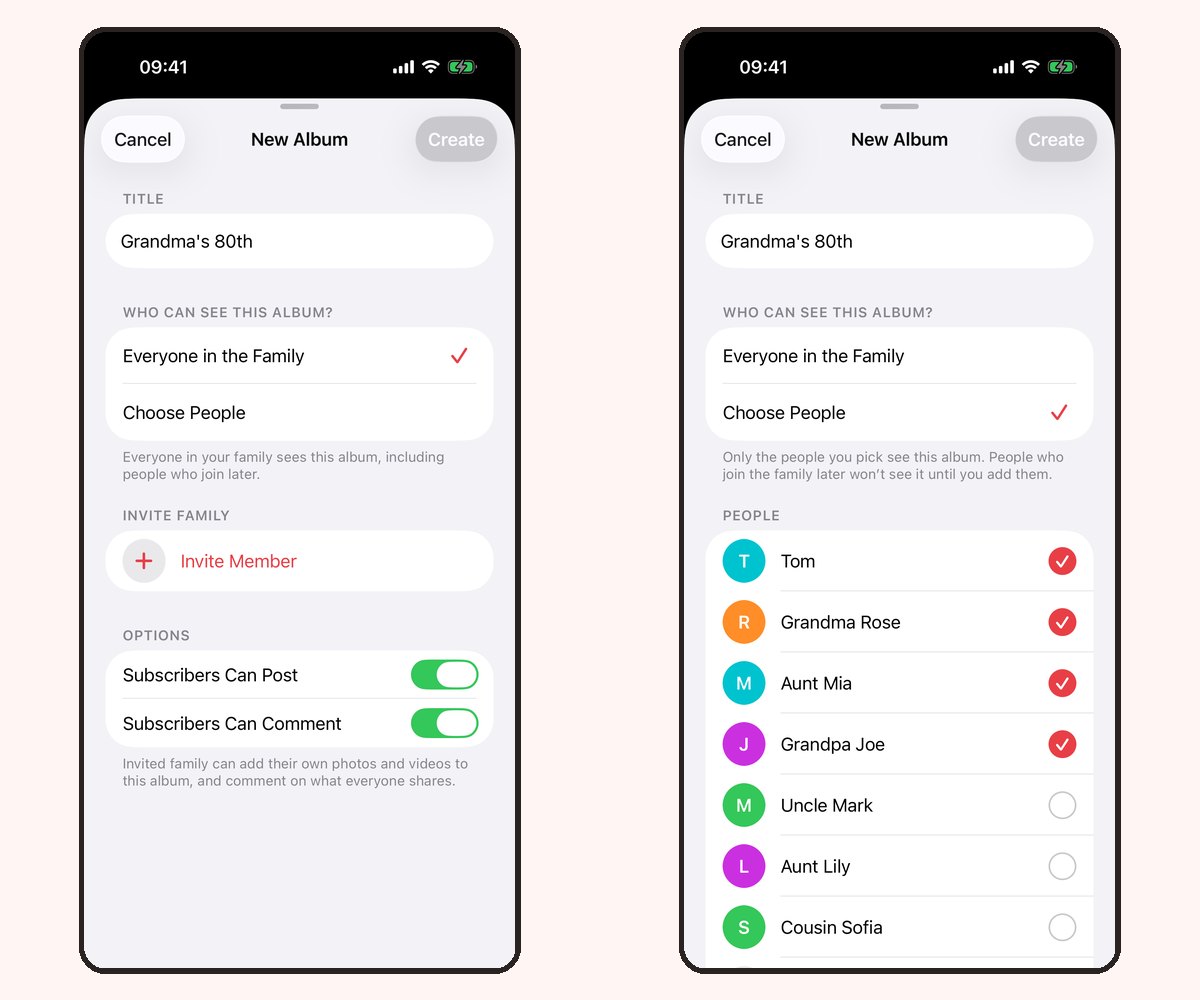
In Our Family Album, create an album on iPhone or iPad and choose Everyone in the Family or Choose People. The first option includes people who join your family later; the second gives the album a smaller audience. Review that choice before adding photos.
Choose a comfortable way for relatives to join
Invite iPhone or iPad users into the app if they want to react, comment or contribute according to their album permissions. For relatives who only want to look, version 1.5 includes Share without an app: a read-only browser link that needs no app or account.
A browser link can be forwarded. Anyone holding an active link can view its album. Send it privately, create a separate link for each recipient and use an expiry when appropriate. See the browser sharing guide.
Agree on sharing beyond the album
A short message can avoid misunderstandings: “We’re keeping these photos within this album. Please ask us before reposting or sending them elsewhere.” This is a family agreement, rather than a technical guarantee.
Avoid adding information you do not need to share, such as a school name, an address in the background or a detailed daily schedule. Ask other parents before posting photos that include their children.
Begin with a few moments
You do not need to upload the entire camera roll. Choose a few favorite photos and add a sentence about what happened. A small, regular update is easier for relatives to enjoy than hundreds of similar pictures.
Our Family Album is free to download, with 20 photos per family per calendar month and no ads. Premium adds unlimited photos and video uploads; one subscription covers the whole family. See the plans or set up your first album.
Frequently asked questions
Can I share baby photos without social media?
Yes. A family album can keep updates with your chosen relatives instead of a public profile. Our guide to sharing without social media explains the options.
Do grandparents have to install Our Family Album?
Not for read-only viewing through a browser link in version 1.5. Posting, commenting and reacting require the iPhone or iPad app and the relevant album permissions.
Can I prevent every copy of a photo?
No. Someone who can see a photo may save it or take a screenshot. Removing access stops future viewing through that access method; it cannot recall existing copies.