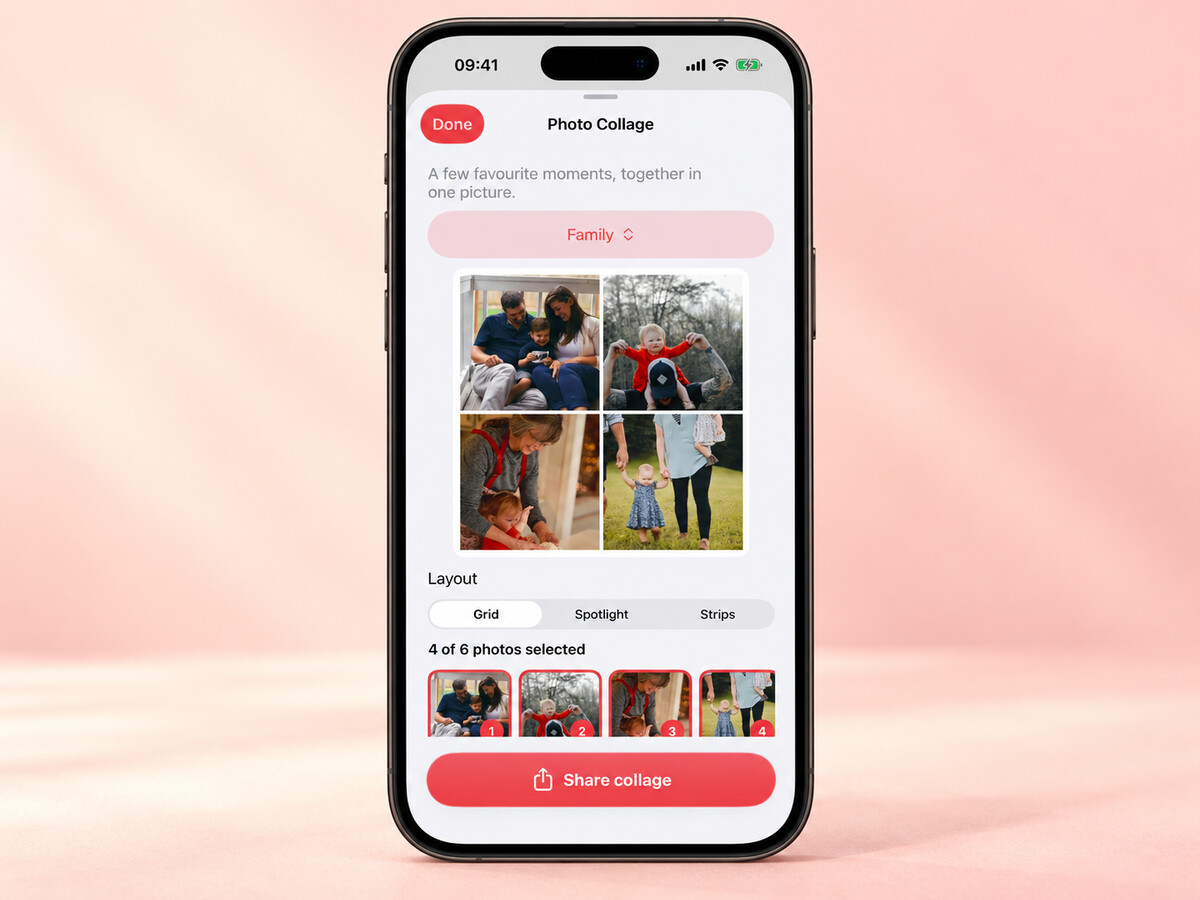
There is a new way to put a few favourite moments together: photo collages in Our Family Album.
Collages are part of version 1.5, which is now available in the App Store. The idea is simple. Choose a few photos from an album and make one picture you can share with your family.
Start in Memories
The collage tool lives in the Memories tab. Choose an album, then select between two and six photos.
You do not have to make a new album just for the collage. Pick the moments you want from one you already have, whether that is a birthday, a holiday or a few everyday photos.

Three layouts to try
There are three choices:
- Grid, for giving the photos a similar amount of space.
- Spotlight, for making one photo the main picture.
- Strips, for arranging the photos in bands.
You can switch between them and look at the preview before sharing. The same selection can feel quite different with another layout, so try a couple and choose the one you like.

Share one picture
When you are happy with it, Share Collage creates a high-resolution image and opens the share sheet.
That is useful when you want to send a small collection of photos together, rather than several separate attachments. It can also give a birthday message or a family update a more personal touch.
The exported collage is a separate image. If you send it outside Our Family Album, it goes to the people and service you choose in the share sheet, rather than staying inside the private album.
Try it today
Update Our Family Album to version 1.5 from the App Store, then open the Memories tab to make your first collage.
If there is a layout you would like to use with your own family photos, please let me know. Your feedback helps decide what comes next.
Thank you for reading ❤️
Manuel Escrig