I have been working on a few changes to make Our Family Album easier to enjoy every day: a favourite photo on your Home Screen, more control over who sees an album, and clearer information about your family's uploads and Premium access.
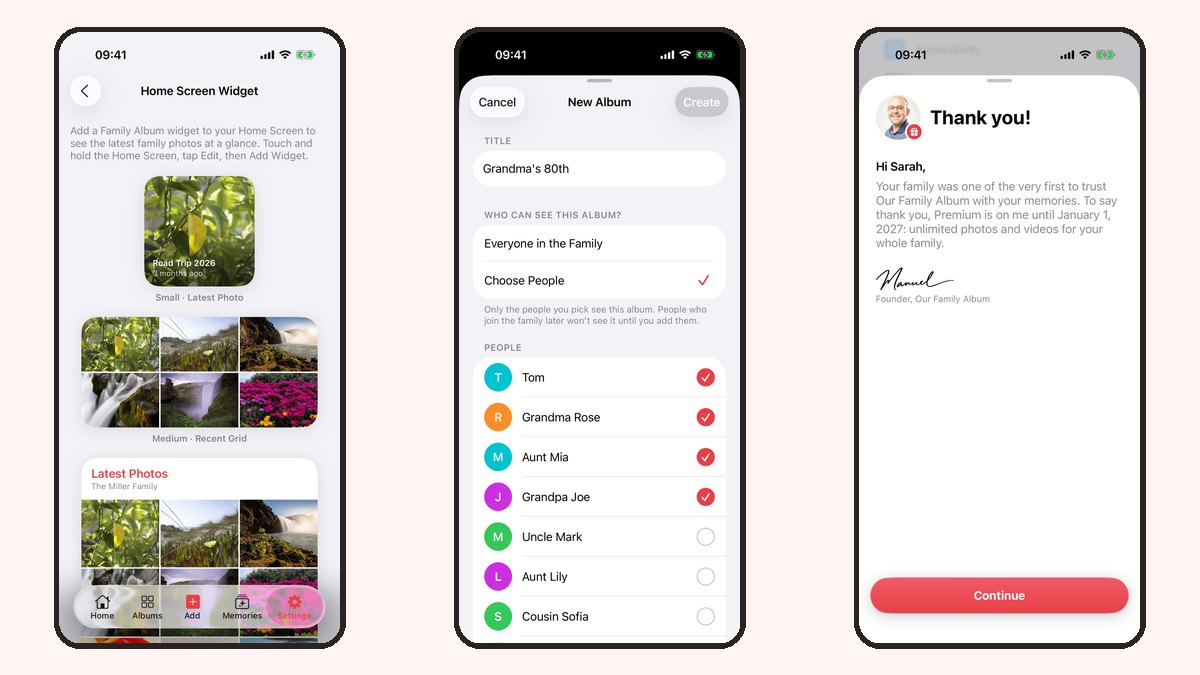
Here is a tour of the latest features I have implemented, using screenshots from the app. The screens show example families and photos. At the end, there is also a first look at photo collages, which are still in development for version 1.5.
Family photos on your Home Screen
Home Screen widgets give your family's moments a place alongside the apps you use every day.
Choose a small widget for the latest photo, a medium widget for a grid of recent photos, or a large widget for this week's moments. There are light and dark appearances, too.

To add one, touch and hold your Home Screen, tap Edit, then Add Widget, and search for Our Family Album. Choose a size and place it wherever you would like to see your family photos. Remember that anyone who can see your unlocked Home Screen can see the widget.
Choose who sees each album
A family holiday might belong with everyone. Another album might be just for a smaller circle. When creating an album, you can now choose between Everyone in the Family and Choose People.
- Everyone in the Family includes your current family members and people who join later.
- Choose People gives access only to the people you select. New family members will need to be added to that album separately.

You can also edit the album's members later. Removing someone takes away their access to that album and its photos. Album options let you control whether invited members can post and comment, so you can decide how everyone takes part.
A clearer welcome for relatives
Family invitations now have a clear place in the Family screen. An incoming invitation shows which family is inviting you and who sent it, with Join and Decline buttons.
There is also a Join a Family option for entering an invitation code. It is a small change that helps a relative understand the next step when you invite them to share your memories.

Know what you can upload
The free plan gives your family 20 photo uploads per calendar month, with the allowance resetting on the first of the month. Premium adds video uploads and removes that monthly upload limit for the whole family.
The photo picker now reflects that difference. Videos show a lock on the free plan, and when your selection reaches the remaining photo allowance, additional items become locked. You can see what is available while choosing the photos you want to share.

A thank-you to the families supporting the app
Settings now makes Premium access easier to understand, with subscription management for paying subscribers and a Personal Thank You note from me.
Eligible founding families also have a gift: Premium until January 1, 2027, including unlimited photo and video uploads for their family. If your family has the gift, you will see A Gift for Your Family in Settings, along with its end date.

I built this app for my own family, and seeing other families use it means a great deal. Thank you for trusting me with these moments and for supporting the work that keeps the app going.
A first look at photo collages
I am also working on photo collages for version 1.5. This feature is still in development.
The collage editor lets you choose two to six photos from one album in Memories, then try Grid, Spotlight or Strips. Once you are happy with the preview, Share Collage creates a high-resolution image and opens the share sheet.

A collage could be a lovely way to send a birthday greeting or a few holiday highlights as one picture. When you share the exported image outside the app, it goes to the people or service you choose in the share sheet.
I would love to hear which of these changes your family finds most useful, and what you would like me to work on next. You can send me a note here.
Thank you for reading ❤️
Manuel Escrig